Enable/Disable the dynamic checkout button

Control whether customers see quick checkout options like “Buy with PayPal” or “Buy with Apple Pay” on your product pages.

Step 1: Access Theme Customizer

  1. Go to Shopify Admin > Online Store > Themes
  2. Find your theme and click Customize

Step 2: Navigate to Product Template

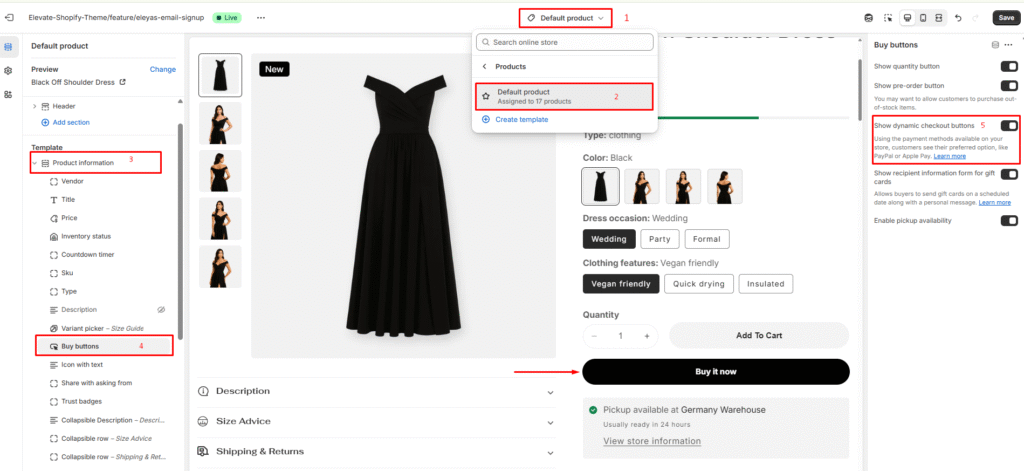
  1. Open the drop-down menu at the top of the page
  2. Select Products > Default product

Step 3: Configure Buy Buttons

Under the Product template section:

Option A: If you have a buy buttons block:

  • Click Buy buttons

Option B: If you don’t have a buy buttons block:
  • Click + Add block
  • Select Buy buttons

Step 4: Toggle Dynamic Checkout

  1. Find “Show dynamic checkout buttons” option
  2. Check to enable or uncheck to disable
  3. Click Save to apply changes

Dynamic checkout buttons will now appear or disappear based on your selection, giving customers faster payment options.

Last updated on November 23, 2025

Was this article helpful?

NEXT

How to Setup Newsletter Configuration

Powered by Support Genix
