Typography

Customize fonts, sizes, and text styling to match your brand.

How to Access
  1. Go to Admin → Online Store → Themes
  2. Click Customize on your theme
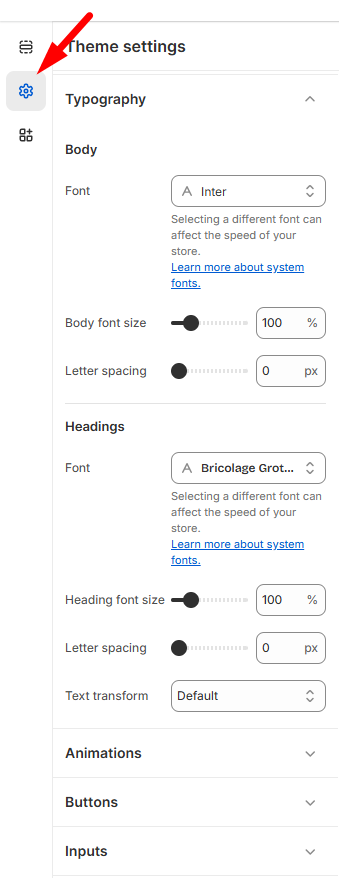
  3. Select Theme Settings → Typography
Body Text
  • Font: Choose from available typefaces
  • Font size: Scale from (80-180%)
  • Letter spacing: Fine-tune character spacing

💡 Tip: Different fonts can affect loading speed. System fonts are fastest.

Headings
  • Font: Select heading typeface (e.g., Bricolage Grotesque)
  • Font size: Scale from 80-180%
  • Letter spacing: Adjust for visual impact
  • Text transform: Apply uppercase, lowercase, or capitalize

Click Save to apply typography updates across your entire store.
Last updated on November 23, 2025

Was this article helpful?

PREVIOUS

Product Cards

NEXT

Social media

Powered by Support Genix
