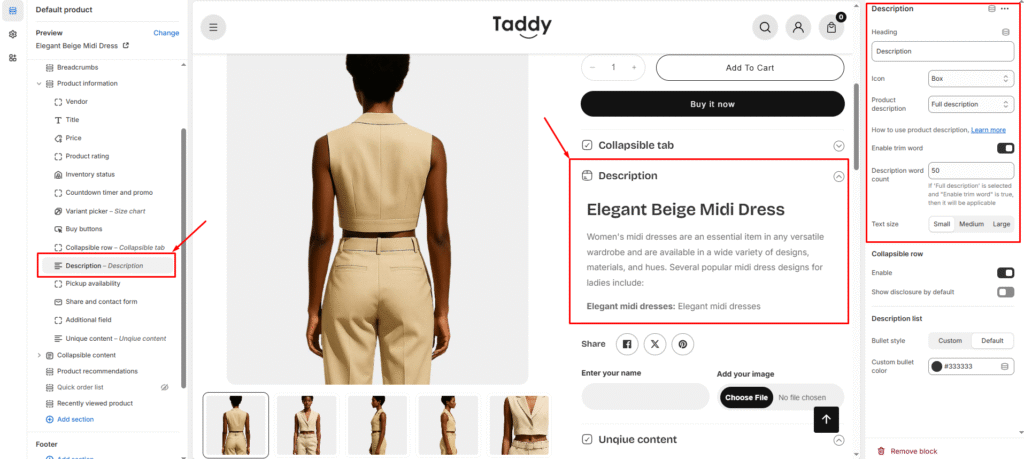
A concise product description gives shoppers the key facts they need without overwhelming them. Here’s how to add and customize it in your theme:
1. Turn On the Short Description Block
Enable the short description section so it appears on product pages: Theme Editor → Product Page → Description.
2. Personalize the Layout
Headings & Titles
Add your own heading text to organize product details.
Use clear, scannable titles so customers can quickly find the info they want.
Visual Touches
Pick an icon to display next to the heading.
Match the icon style to your brand or product category.
Content Options
Choose whether to show a brief overview or the full description.
Decide which version appears on product pages, collection grids, or quick-view pop-ups.
3. Why Short Descriptions Help
Faster Browsing: Shoppers can absorb key details at a glance.
Better Collection Cards: Compact text looks clean in product grids and sliders.
Flexible Presentation: Switch between summary and full details depending on context.
Improved Readability: Break up long descriptions into easy-to-read segments.
This setup is ideal for stores with rich product information—giving visitors a quick snapshot while keeping full specs just a click away.eed both quick summaries for browsing and comprehensive information for purchasing decisions.