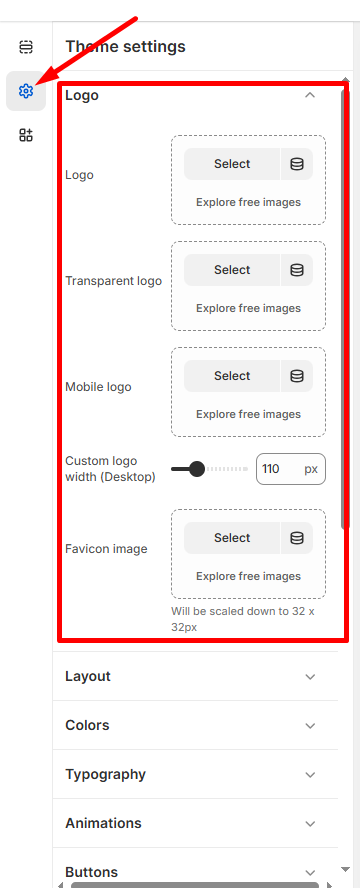
Upload and customize your brand logos for different sections of your store.
How to Access
- Go to Admin → Online Store → Themes
- Click Customize on your Taddy theme
- Select Theme Settings → Logo
Logo Types
Main Logo
- Upload: Click Select to upload your primary logo
Transparent Logo
- Alternative version: Upload a logo optimized for transparent backgrounds.
- Usage: You can show a different logo for the transparent header.
Mobile Logo
- Mobile-specific: Upload a logo optimized for smaller screens.
- Responsive: Ensures clear logo visibility on mobile devices.
Favicon
- Browser icon: Upload a small icon for browser tabs and bookmarks.
- Size: Use a square image (ideally 32×32 or 16×16 pixels).
- Format: Best results use PNG, ICO, or SVG format.
Logo Sizing
- Desktop width: Adjust logo size using slider (default: 110px).
- Responsive: Mobile sizing adjusts automatically.
💡 Tip: Use PNG format with transparent backgrounds for best results across different page layouts.
Click Save to apply logo updates across your store.