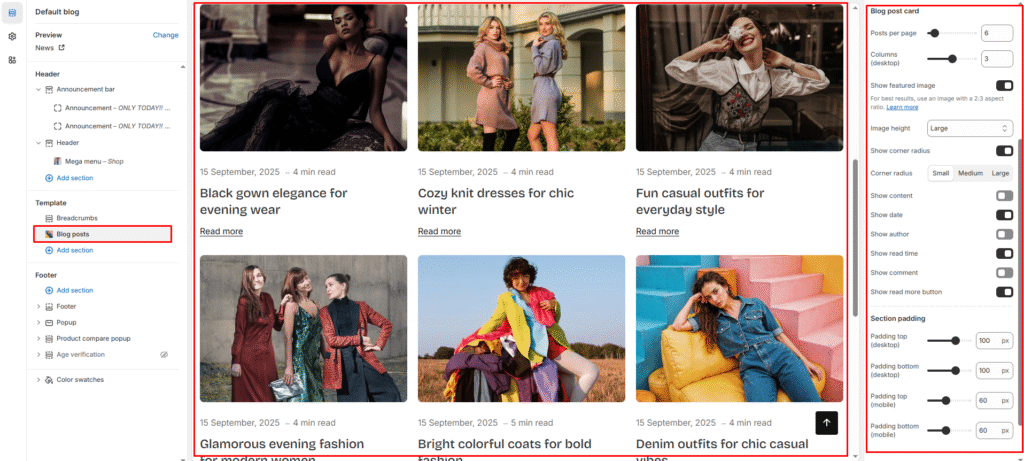
Create and customize your blog to showcase content and engage visitors.
How to Set It Up
Access your blog page:
- Go to your theme customizer
- Select Blog posts from the template options
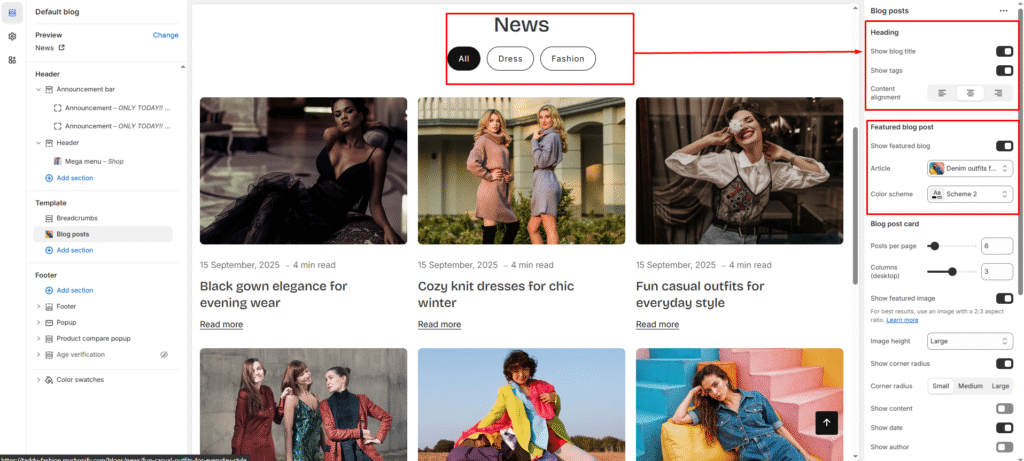
Blog Heading
Show or hide elements:
- Show blog title: Display page title at the top
- Show tags: Add filtering buttons like “All,” “Dress,” “Fashion”
- Content alignment: Choose left, center, or right positioning
Featured Blog Post
Highlight special content:
- Show featured blog: Display one post prominently
- Select article: Choose which post to feature
- Color scheme: Pick colors that match your brand
Blog Post Cards
Control your layout:
- Posts per page: Set how many posts to show (like 6)
- Columns: Choose grid layout (1, 2, or 3 columns)
- Featured image: Show or hide post images
- Image height: Pick Small, Medium, or Large sizes
Card styling:
- Corner radius: Make cards rounded or square
- Show content: Display post excerpts
- Show date: Add publication dates
- Show author: Include writer names
- Show read time: Estimate reading duration
- Show comments: Display comment counts
- Read more button: Add “Read more” links