Disable the website’s cart drawer.

The cart drawer lets shoppers quickly view items they’ve added, but you may want to turn it off—for example, to streamline checkout or meet specific app requirements. Here’s how to hide the cart drawer so customers go directly to the payment stage after adding a product.
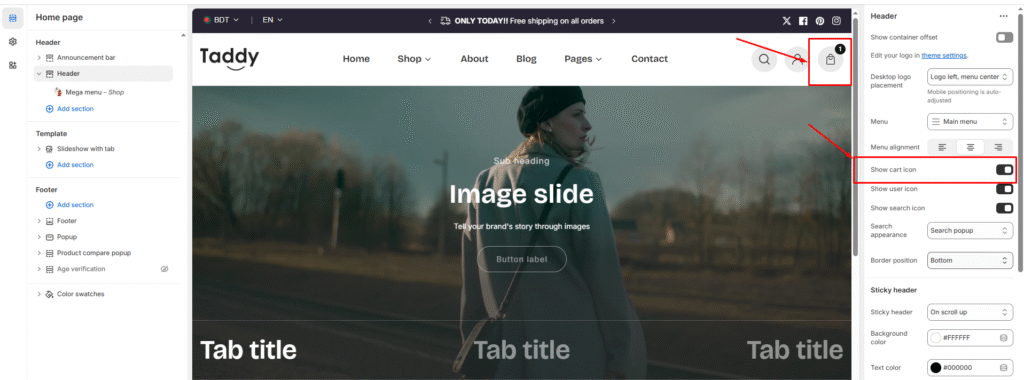
Steps

  • Click Save to apply the change.
  • In your Shopify admin, go to Online Store → Themes.
  • Find the Mavon theme and click Customize.
  • Select Header in the theme editor.
  • In Header settings, clear the checkbox for Show cart icon.

Steps to Disable Cart Drawer

  1. Go to Shopify Admin > Online Store > Themes
  2. Find your Mavon theme and click Customize
  3. Click on the Header section
  4. In Header settings, uncheck the option “Show cart icon”
  5. Click Save to apply changes

Last updated on November 23, 2025

Was this article helpful?

PREVIOUS

How to enable the transparent header

NEXT

How to setup Payments in Your Shopify Store

Powered by Support Genix
